AI-generated content can be revised, paraphrased, or combined with human input, making it more difficult to identify through manual review alone. In such cases, it’s helpful to use multiple verification methods.
For example, you can analyze the text with Quillbot’s AI Detector to assess potential AI involvement and use Quillbot’s Plagiarism Checker to identify any content that may closely match existing online sources. Together, these tools can provide a more comprehensive evaluation of a document’s authorship.
Common indicators of AI-generated writing include repetitive sentence structures, generic explanations, overly consistent tone, and a lack of original insights or personal experiences.
If you’re working with AI-generated content, learning how to add a more natural voice, varied sentence patterns, and personal touches can help. For practical tips, see Quillbot’s article, How to Make AI Writing Sound More Human.
One of the easiest methods to check if a PDF document was written by AI is to copy the text from the PDF and analyze it with an AI detection tool.
Quillbot’s AI Detector can help identify patterns commonly associated with AI-generated writing, providing additional insights as well as manual review.
A PDF itself cannot reveal whether it was AI-generated. Most PDF files don’t contain information that directly identifies whether the content was written by AI.
To assess authorship, you’ll need to analyze the text itself for common AI-writing patterns or use a tool such as Quillbot’s AI Detector to evaluate the content.
You can use AI responsibly when writing by treating it as a writing assistant rather than a replacement for your thinking. Use AI to brainstorm ideas, create outlines, or refine drafts, then add your own expertise and verify important information.
AI-generated drafts should always be reviewed for clarity, accuracy, and tone. Tools like Quillbot’s Paraphraser can help rewrite awkward passages, while the Grammar Checker can identify grammar, spelling, and readability issues. Human review remains an essential part of the writing process.
AI-generated content may contain patterns such as repetitive phrasing, generic examples, or predictable sentence structures.
Tools like Quillbot’s AI Detector can help identify text that may appear AI-generated, allowing you to review and refine your content before publishing. However, the goal should be to improve quality and authenticity rather than simply trying to avoid detection
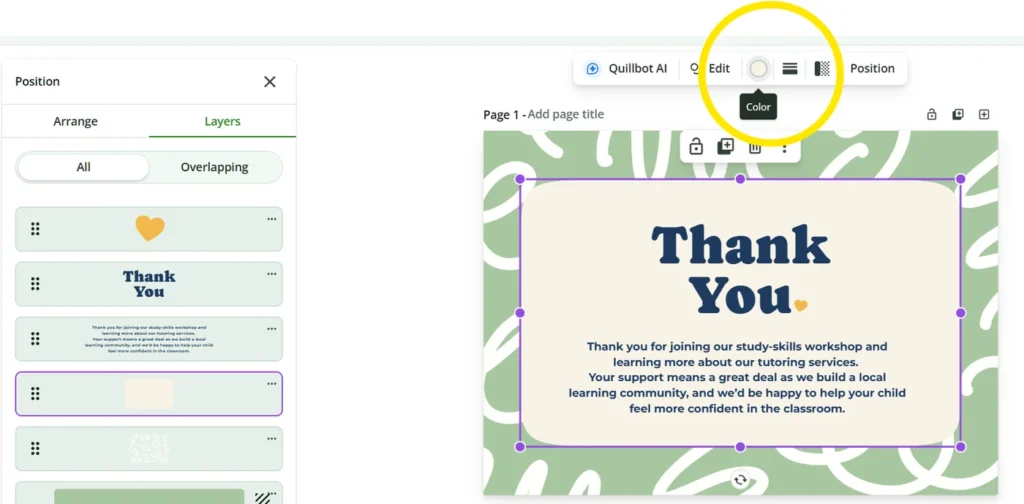
To change the color of an element in a thank you card template, try clicking on it to see if color options appear.
In Quillbot’s free online card templates, you can view all the elements in a design by clicking “Position,” which brings up the layer view. To change the color of an element, all you need to do is click on the element in the layer view and use the color options that appear in the menu above the design.
If you want to print the cards you make with thank you card templates, PDF is usually the best file format because it preserves your layout and design quality.
If you’re making a card for social media, then PNG is a good choice because it keeps text, graphics, and colors looking crisp on screen.
Select the “PDF Print” option in Quillbot’s card templates when you’re making cards that you want to print.
Several tools can support the editing process. Quillbot’s Humanize AI tool helps make AI-generated text sound more natural, the Paraphraser offers alternative ways to express ideas, and the Grammar Checker helps improve clarity and correctness before publication.